AI for your online store: other bots ask, AURA sells
AURA is the AI in your store. In the storefront, it helps customers find and buy. In the admin, it writes, translates, launches promotions, and suggests campaigns for you. In support, it responds in minutes. It follows your rules, and you make the important decisions.
Knows your store · Understands your customer · Stops where you say
Aura Chatsells in your storefront
A gift under €150, cat eye
1
Cat Eye, black€119.00Choose an action
2
Cat Eye, rose gold€139.00Choose an action
Aura Searchfinds products in your storefront
Products
Rosa set€72.00
Categories · Brands
Gift setsRosa
Aura Studiowrites in your admin
450 ml insulated mugProduct description
AcceptReject
Aura Cart Rulesa promotion from a sentence
Ifcart value is over €80
Andthe customer has no previous orders
Thenshipping is €0
Campaigns and segmentsAI in marketing
A segment from a sentence
Ordermost recentwithin the past 30 days
Campaign suggestion
Black FridayNovember 27 - 30
EmailViberdraft
AURA support 24/7for merchants, by email
To support@cloudcart.com: card payment returns an error.
Checking the certificateExpired
Renewing the certificateDone
Email reply: the certificate is renewed, and the test payment went through.
Coming soonthe next tool
The next toolEvery new AI feature in CloudCart carries the AURA name.
Select a tool
AURA
Everything AI in CloudCart is called AURA
One name for the tools that work alongside you: selling in your storefront, writing and organizing in your admin, answering support questions. Every new tool we add carries the same name.
One name, three roles
Sells, writes, and answers for you
Each tool works where your store needs it. They share one name because they serve one goal: your store sells more, and you manage it more easily.
In the storefront
You sell more
Aura ChatThe salesperson that asks, shows, and recommendsbeta
Aura SearchSearch that understands, even with typosbeta
Aura Search sorts results on its ownAutomatic ranking of search resultsComing soon
In the admin
You manage more easily
Aura StudioDescriptions, SEO, and translations for entire lists
Aura Cart RulesA promotion from a single sentence
AURA in marketingSegments, campaigns, and messages
New skills in Aura StudioMore admin work that AURA handlesComing soon
In support
You get help around the clock
AURA supportFor merchants, 24/7, by email
The next toolEvery new AI tool comes hereComing soon
AURA doesn't make things up. It works only with what's in your store, and you decide what it can do and when it stops.
Aura Chat · beta · your storefront salesperson
Understands the situation and knows what to do
From choosing a product to placing an order, making a return, or asking for a discount, Aura Chat understands what the customer wants and moves the conversation forward with the right next step.
Select a situation
When the customer is still choosing
The customer knows what they need, but not which product: “something quiet for the bedroom” or “a gift for my dad.” Aura Chat asks questions with buttons for answers, narrows the options, and shows a few suitable products.
Less searching, faster decisions
AURAyourstore.bg
I'm looking for something quiet for the bedroom. It's a small room
Do you want to add moisture to the air or cool the room?
More moistureCoolingBoth
Here are the two I'd show you first:
QuietestBedroom humidifier€79.00
Also coolsBladeless fan€149.00
When the customer is ready to choose
Aura Chat compares the options, resolves the last concern, and recommends one product with a clear reason. Then it takes the customer straight to the cart.
A recommendation with a reason, not a list of features
AURAyourstore.bg · Bedroom humidifier
This one or the fan I was just looking at?
I'd go with the humidifier: you're looking for something quiet for the bedroom, and it's designed for exactly that. The fan is the better choice if you also want cooling.
Add to cartView productAsk another question
✓ Added to cart · €79.00
When the customer asks about their order
Aura Chat asks for the order number from the confirmation and the email used for the order. Then it shares where the shipment is, whether it's paid, and what the courier's tracking says.
It shows nothing without both, so no one can see someone else's order
AURAyourstore.bg
Where is my order?
Enter the order number from your confirmation and the email you used to place the order.
Confirmation number1051✓
Email used for the order•••@abv.bg✓
Order 1051 is paid and on its way:
Received · Oct 8
Paid by card
Handed to courier · Oct 9
At the courier’s office in Plovdiv
Track with courier →
When a customer wants to return a product
Aura Chat sends a code to the email used for the order, asks only what your return settings allow, and submits the request. You see it in the admin and make the decision.
Less manual work for your team
AURAyourstore.bg
I want to return the glasses. They don’t suit me
I sent a 6-digit code to the email used for your order. Enter it here and we’ll continue.
482 913
Which product are you returning?
Cat Eye · rose gold
✓ Return request submitted · R-1051
When price is the last hurdle
If you allow it, Aura Chat offers a personal, single-use code. Only in the situations you describe, and up to the limit you set.
The right incentive, only when it makes sense
AURAyourstore.bg · Cat Eye · rose gold
They’re nice, but a little expensive… I’ll think about it
I understand. If you decide today, I can add a 5% discount on these glasses. The code is valid until Sunday.
AURA7KQ2X
✓ Based on your rule: hesitation over price
Each of the five is enabled separately. If you only want product advice, enable just that.
Aura Chat · sales
Turns hesitation into a decision
When a customer says “I’ll think about it,” there’s often a specific reason: shipping, price, availability, size, or one more question. Aura Chat understands what’s holding them back, checks the details, and helps the conversation lead to a decision.
Knows when to keep going and when to stopIt makes one meaningful attempt to help. If the customer declines again, it respects their decision and ends the conversation.
AURAyourstore.bg · Bladeless fan
I like it, but I don’t know if it’ll arrive by Friday… Thanks, I’ll think about it.
I understand. I checked the shipping terms: orders placed by 16:00 ship today, and delivery takes up to 2 business days. It will arrive before Friday.Source: Shipping
Should I add it to your cart so it’s with you by Friday?
Yes, add itNo, thanks
✓ Added. Your cart is ready for checkout.
Aura Chat addresses the hesitation, not the polite goodbye.
Aura Chat · discounts
Personal discounts at the right moment
You set the rules, and Aura Chat decides when a discount will help close the sale. The code is personal, single-use, and always within the limits you set.
01
Describe when it can offer a discount
In your own words: hesitation over price, a delayed delivery, or another specific situation. Any situation you haven’t described gets a “no,” even if the customer asks politely.
02
Set the limit, not the amount
Choose the type - percentage, fixed amount, or free shipping - and the maximum. Aura Chat starts below the limit and cannot exceed it.
03
Choose what it applies to
The products it has shown, an order over a certain amount, or let it choose. Every code has a condition.
04
Set how long it’s valid
When the code expires and how long the same customer must wait before receiving another.
05
Add your own situations
Describe other situations in your own words, such as a large order from a business. Aura Chat considers them every time it makes a decision.
You set the limits. Aura Chat picks the right moment.
Aura Search · beta · storefront search
Finds it even when the customer doesn’t know the word
Aura Search replaces your store’s search. It searches by meaning and keywords, understands misspellings, and shows products, categories, and brands as the customer types.
Scroll - you drive the search
yourstore.bg
televison
Products
TV 55" 4K QLED€1,099.00
TV 43" Smart€429.00
TV stand€89.00
Categories
TVsStands and accessories
Products
Bedroom humidifier€79.00
Bladeless fan€149.00
Air conditioner with sleep mode€699.00
Categories
HumidifiersFansAir conditioners
No results for “purse”The customer closes search and leaves
Products
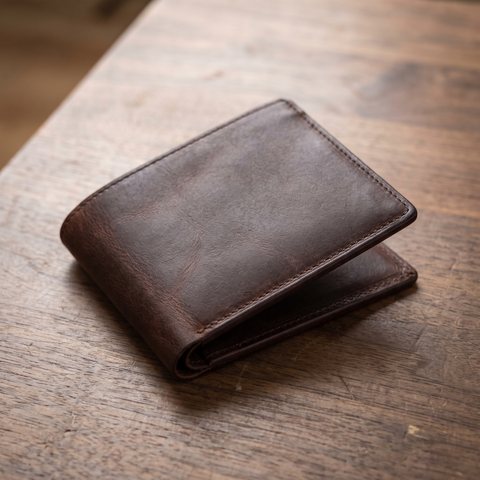
Genuine leather wallet€49.00
Pinned
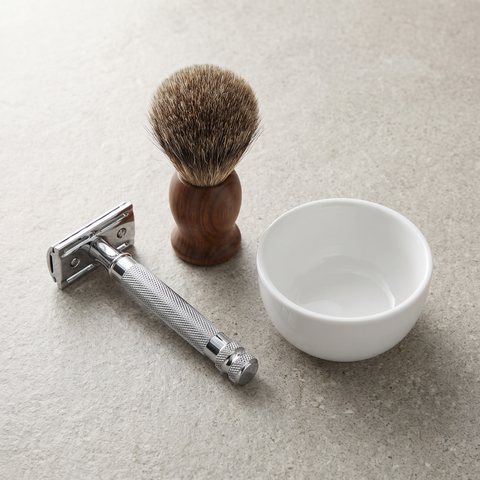
Shaving gift set€65.00
Categories
Wallets and accessoriesGifts for him
Aura Search · Searches · No results
purse46 searches0 ordersImprove results
Add synonym
Customers typepurse
⇄
In your catalogwallet
Both directionsSave
Pinned products
Up to 10 products at the top for a keyword, category, or brand, in the order you choose.
Ranking signals
Give more weight to products that sell, are in stock, are discounted, or are recommended by you.
What customers search for and can't find
See popular searches, searches with no results, no clicks, or low conversion, and the orders that follow each one.
Aura Search is billed monthly, with a search quota. When the quota runs out, nothing shuts off and nothing is lost.
Coming soonAura Search will rank results on its own
Aura Studio · your employee in the admin
Writes, translates, and interprets images
Aura Studio handles product and category descriptions, SEO titles, page URLs, and translations. It writes them using data already in your store and product images. You accept, edit, or rewrite.
yourstore.bg/admin · Products · Thermal mug 450 ml
Thermal mug 450 mlKitchen and travel · €24.00
BGENROEL
450 ml insulated mug with a matte green finish and a black lid. Double walls keep your drink warm on the way to work.
Thermal mug 450 ml, matte green | yourstore.bg
/product/termochasha-450-ml-matovo-zelena
Saved when you click “Save”
Entire lists at onceDescriptions for multiple products run as a single task. Every generation stays in the history with a rating.
See the cost upfrontEach generation shows how many tokens it will cost before you run it.
Translation on autopilotEnable your languages, and new and updated content is translated automatically every 8 hours.
Coming soonNew skills in Aura Studio
Aura Cart Rules and AURA in marketing
Describe it in words, AURA puts it together
Describe the promotion, segment, and customer message in a single sentence. AURA suggests campaigns on its own. The result opens in the editor. You launch it.
A discount on bestsellers and a notification to subscribers the day before launch.
All subscribersEmailViberCreated ✓
A draft with a title, description, channel, and sample text
Suggests campaigns based on the season, products sold, and customer behaviorCampaigns →
Message
Channels · Viber, SMS, Web Push · Write with AI
tell the customer their order is being prepared
Hi, {$customer_first_name}! Order {$order_id} is now being prepared. We'll let you know when it's on its way.
Viberup to 1,000 characterswith channel variables
Writes in the language of your request and stays within the channel's character limit
How AURA works
Works only with your store, by your rules
AURA uses only your store's catalog, orders, inventory, locations, and pages. Your information never mixes with other merchants' data, no matter how the question is phrased.
Store pagesyourstore.bg/vrashtane-na-stoka
Product returns
You may return the product within 14 days of delivery, unused and in its original packaging.
Quotes word for word, with a linkSummer campaign: 30 days, through Aug 31, 2026history
Today is Oct 12, 2026 - the expired campaign's terms no longer apply.
Catalogyourstore.bg
Insulated mug 450 ml€24.00 · yourstore.bg catalog
Capacity
450 ml500 ml · manufacturer's website
Dishwasher safe
not in the catalogmug - yes, lid - hand washmanufacturer's manual
Conflicts with the catalog - the catalog takes priority: 450 ml
Aura StudioProduct description · Insulated mug 450 ml
450 ml insulated mug with a matte green finish and a black lid. Double walls keep your drink warm on the way to work.
AcceptRejectawaiting your review
Rulefree shipping over €80 for new customersin the editorSegmentordered in the last 30 daysin the editorCampaignBlack Friday, November 27 - 30draft
Aura Chat and Aura Search reports
See where your catalog loses sales
The two reports show what customers ask and search for, what they can't find, and what sells. They help you see what to add or fix in your catalog, regularly, not just once.
Scroll - you control the report
Scroll or select a signal - see it highlighted on the rightSelect a signal - see it highlighted below
yourstore.bg/admin/apps/advanced_searchsample data
OverviewSearchesOptimizationAI and relevanceSettings
01.09.2026 ~ 30.09.2026
Searches
8,920+12% vs. previous period
Searches with a click
5,130+9% vs. previous period
Orders after search
212+19% vs. previous period
€Revenue after search
€17,384+21% vs. previous period
Sales impact
3.1×higher conversion rate after search
Conversion rate with search2.38%
Without search0.77%
Average order value€82.00
Revenue per search€1.95
Search quality
82Good
Relevant results88%
Searches with results93.5%
Searches with a click57.5%
Average time to product9 sec
What to fix first
“wallet” returns no resultsView all
“thermos” is searched often but gets no ordersPin a product
Out-of-stock products appear first for “air conditioner”Adjust the signal
AURA support · for merchants
Help for your store, around the clock
CloudCart support is also called AURA. It’s for you, the merchant, not your customers. Email support@cloudcart.com anytime and get a reply by email.
01A technical issue with your store. A payment won’t go through, a storefront error, something stops working. AURA checks what happened in your specific store.
02Not sure where to find something. The reply gives you the exact path in the admin.
03When you need a person, a team member takes over. Just say so in your email, and they pick up from there.
Hi, that’s what Aura Search does - it handles typos and searches by meaning. You’ll find it here:
AppsAura Search
It activates once you choose a monthly plan - the button is at the top of the “Overview” screen. You can also see which searches return no results there.
Coming soon
What’s next for AURA
We’re adding new AI tools for your storefront, admin, and support. Each new tool carries the AURA name and appears on this page.
Before you turn it on
Questions everyone asks
01 / 09
What does AURA know about my store, and where does it get that information?
Only what’s in your store: your catalog with prices and stock levels, your published shipping, return, and warranty pages, your orders, and your physical locations. It doesn’t answer from general knowledge or read other sites, except when looking up a product attribute you haven’t filled in.
02 / 09
Can it make something up?
It doesn’t invent an attribute you haven’t entered, a timeframe you haven’t promised, or a discount you haven’t authorized. When information is missing, it says so in one sentence and keeps helping. These rules take priority over your instructions and can’t be turned off.
03 / 09
Does it work in Bulgarian?
Aura Chat replies in the language your customer uses. You write its instructions in Bulgarian in a text field in the admin: the tone, what to suggest, and what to avoid. Aura Studio translates into the languages supported by the CloudCart storefront.
04 / 09
Can I stop it or limit what it does?
Yes, at every level. Each Aura Chat skill turns on and off separately. Products and categories can be hidden from its recommendations, discounts follow your limits and conditions, and the entire app has a stop button that keeps your settings. Aura Studio skills also turn on one at a time.
05 / 09
What does it cost, and which plan includes it?
Aura Chat starts with an initial credit balance so you can try it with real customers, then you top up with credits. You set the limit. Aura Search is billed monthly, with a search quota. Aura Studio uses tokens from your plan, while Aura Cart Rules templates don’t use AI. A consultant explains what’s included in your plan and what makes sense for your volume.
06 / 09
What happens when the Aura Search quota runs out?
The dropdown below the search bar switches to keyword search until the start of the next month or until you add a search package. The app stays on, and pinned products, synonyms, and the results page work as before.
07 / 09
Does AURA publish anything on its own?
In the admin - no. An Aura Studio description is added to the product when you accept and save it. Aura Cart Rules rules, segments, and campaigns open in the editor, with campaigns saved as drafts. In the storefront, Aura Chat acts on its own, but only within the skills you’ve enabled: it gives discounts only according to your rules, and return requests wait for your decision.
08 / 09
Where does my customers’ data go?
Each conversation has access to exactly one store: yours. There’s no way for one merchant’s assistant to access another merchant’s catalog, orders, or customers. Conversation transcripts are kept for six months, then deleted.
09 / 09
Is there an API for developers?
The platform has an Admin GraphQL API, a REST API, and tools your AI assistant understands. Find the details on the “For developers” page.

 1
 2


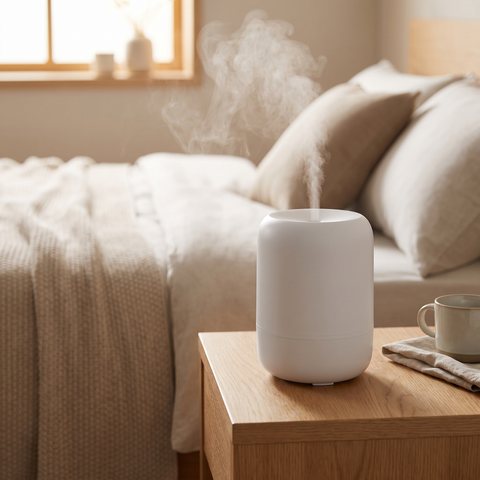 QuietestBedroom humidifier€79.00
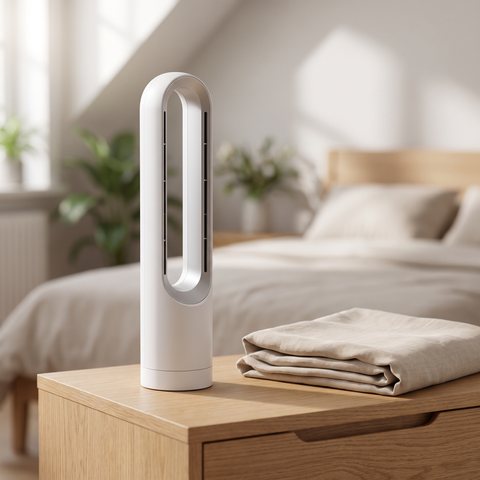 Also coolsBladeless fan€149.00