
Multistore and languages

Many stores, one admin: a separate store for each market

Romania isn't Bulgaria in another language. Each market gets its own store with its own couriers, payments, currency, and prices. All stores share the catalog and inventory.

Bulgaria · Romania · Greece · Each market's couriers and payments built in

BGyourstore.bgROyourstore.roGRyourstore.gr

Scroll - you chart the route

A separate store, by design

Each market with its own couriers, payments, and currency

Customers in each country expect different couriers, payment methods, and currencies. That's why each of your stores has its own admin, prices, and emails in the customer's language.

BulgariaEcont, Speedy, and BOX NOW · CloudCart Pay, Borica, ePay, and myPOS

RomaniaSameday, FAN Courier, and Cargus · Netopia and EuPlătesc

GreeceACS, Speedex, and BOX NOW · Cardlink · Skroutz integration

The design can stay the same. You choose prices, product ranges, and campaigns for each market separately.

The catalog across stores

The catalog moves from store to store in minutes

The catalog is copied to the new market's store, translated field by field, with prices multiplied by your chosen factor. The feed then updates it automatically, so products don't need to be uploaded twice.

1 · Translation

The market's language

Multilang copies products to the new market's store and machine-translates them. You choose which fields to translate and whether each new product transfers automatically or after your approval. Aura Studio writes and translates descriptions and SEO copy. Translation is included in higher-tier plans.

All about AURA

2 · Outbound

The feed goes out from the first store

XML Feed Generator publishes all or part of the catalog at a public URL, filtered by category, brand, or tag. It adds a markup if the market calls for it, and a password if the feed isn't for everyone. The number of products in the feed grows with your plan.

3 · Inbound

The second store imports it

XML Import uploads it once. XML Sync follows it on a schedule. You choose which fields to update: quantities, prices, status. Descriptions you've edited for the market stay intact. Every run has a history.

Scroll - you expand the tower

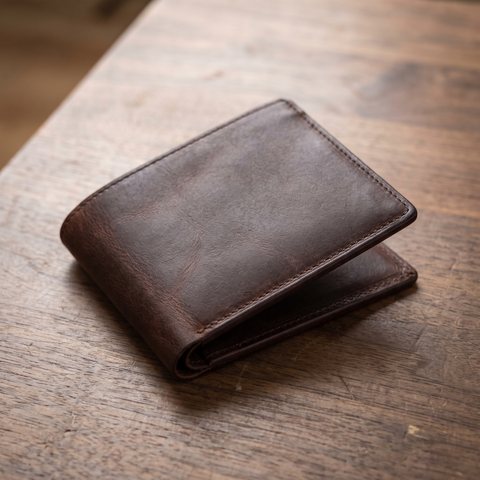
Image
TitleLeather wallet
DescriptionHand-stitched, genuine leather
VariantsColor: brown, black
SEO metaLeather wallet | yourstore.bg
Price€49.00
Quantity18 units
StatusActive
Imagealt: Leather wallet
TitleLeather wallet
DescriptionHand-stitched, genuine leather
VariantsColor: brown, black
SEO metaLeather wallet | yourstore.bg
Price€49.00
Quantity18 units
StatusActive

One catalog, maintained in one place. The other stores follow it automatically.

Stores Sync

One inventory across all your stores

Stores Sync connects your stores. An order, manual adjustment, or return in one updates the quantity in the other within seconds. Only quantities sync. Each market keeps its own prices and orders.

yourstore.bg/ochila-cat-eye
Cat-eye sunglassesOut of stock

Accessories / Sunglasses

Cat-eye sunglasses

129,00 €

In stock: 2 units

Shipping with Econt: €4.90

SKU 2210

yourstore.ro/ochelari-cat-eye
Ochelari de soare Cat-eyeStoc epuizat

Accesorii / Ochelari

Ochelari de soare Cat-eye

642 lei

În stoc: 2 buc.

Livrare Sameday: 14,00 lei

SKU 2210

Click the button in one store and watch the other.

Seconds after each order, the same item has the same stock quantity in every store.

Before your second market

Questions everyone asks

01 / 05

How many admins will I have

One for each market, by design. Each market is a separate store with its own admin, couriers, payments, currency, prices, and VAT rate. The foundation stays the same: the familiar CloudCart admin. Switch between stores in one click, without a new password. All stores share the catalog and inventory.

02 / 05

Can I use the same design

Yes. The new store starts with the same theme as the first, and products, categories, and pages are copied over. Your customer in Romania sees a familiar storefront in their own language. From there, the store is independent and can switch themes if the market calls for something different.

03 / 05

Can prices differ

Yes, and that's the norm. The feed can include a markup or discount for the market. When Multilang copies products, it multiplies prices by your chosen factor and rounds them. Each store then manages its own prices in its own currency. Stores Sync only changes quantities, never prices.

04 / 05

What happens if I sell the last unit in both stores at the same time

Stores Sync sends the new quantity to every connected store right after the order, usually within seconds, so the risk is small. If two orders for the last unit do arrive at exactly the same time, the app doesn't block them. It syncs quantities, and each store's change history shows where each change came from. A new store in the group can run a full sync with one button.

05 / 05

Do I need a separate domain for each market

Each store starts at a CloudCart address, then gets its own domain (.ro, .gr, or a subdomain of yours) with a certificate that is issued and renewed automatically. Google automatically understands which store serves which language.

Ready to grow with CloudCart?

A consultant explains what you need for your second market and in what order.